ndlosoro.blogspot.com - Realism Tattoo on Pinterest Tattoo Abstract, Indian See more about Tattoo Abstract, I Think My Moms Gone Crazy Amazing Back Tattoos!!! Some are hard to believe!!! Realistic Portrait & Color Realism Tattoos
Valentina Ryabova is a Russian tattoo artist that's made quite the name for herself with her tattoo style. She's become very good at creating lifelike tattoos that look like real life portraits. You've got to take a look for yourself.
Read more » Download android mobile apps Realistic Portrait Tattoos You Have To See To Believe Mugshots Here:
As you All know that Samsung Galaxy Y has only 190 MB internal memory.Which is of course very low for most users .So if we increase the internal memory we can install as many more apps and games as we like without worrying about Internal memory full error You can increase internal memory of any android phone here with m instructions. Try this procedure at your own risk. I will not be held responsible if your SD card is empty so take backup Dont worry nothing will happen to your phone if anything goes wrong
Downloads :
4shared - CWM.zip
Mediafire -Link2sd Apk
Instructions :
Step 1. You first need to root your Samsung Galaxy Y. If you dont know What is Root? or How to Root?click here
Step 2.Proceed with caution and backup your data first!
You can’t obviously increase your internal memory literally. But you can allow your Android to use some of your SD card’s storage to use as internal memory to install applications and games directly. This helps you keep your phone running at an excellent condition as well as let you install as many games and apps as you wish.
Step 3.Switch off your phone and boot into recovery mode by pressing Volume up + Home button + Power Key together
Step 4.you are now in Recovery mode here Touch screen does not work use volume up and down button to go up and down and home button to select.
Step 5.Select “apply update from SD card” then Locate and Select “CWM.zip”
Step 6.Now you are in Clock-recovery Mode here select “advanced” now select “Advanced and Debugging”, select “Partition SD Card” On the screen “For Ext Size”
Step 7.Select the size you will want your new internal memory storage to be. A max size of 1024 MB (1GB) is advised.
Step 8.On the “swap size” screen , select 0M Now you wait a minute for your SD card to be partitioned.
Step 9.Afterwards, select “reboot recovery”, then select “reboot system now”.
Step 10.Your phone will reboot.Install link2sd on your phone.Now Select link2sd Choose “recreate mount script”, then select “ext3?.
Step 11.After reboot when you open link2sd “recreate mount script” you will see that your partition is selected is an ext partition
Step 12.Reboot your phone. After your phone reboots, you may launch the linksd app again and move installed software to the partition you created by “linking” them.
@Enjoy..
Download applications for android phones Tutorial How to Increase Internal Memory of Samsung Galaxy Y GT S5360 Here:
The acclaimed action fantasy defense game is now available on Android for Phones and Tablets! Get ready for an epic journey to defend your kingdom against hordes of orcs, trolls, evil wizards and other nasty fiends using a vast arsenal of towers and spells at your command! Fight on forests, mountains and wastelands, customizing your defensive strategy with different tower upgrades and specializations! Rain fire upon your enemies, summon reinforcements, command your troops, recruit elven warriors and face legendary monsters on a quest to save the Kingdom from the forces of darkness!
GAME FEATURES: ? Epic defense battles that will hook you for hours! ? Command your soldiers and see them engage in hand to hand cartoon battles! ? 8 specialized tower upgrades to customize your strategy! Mighty Barbarians, Arcane Wizards, Forest Rangers to name a few. ? Over 18 tower abilities! Have your Sorcerers summon earth elementals and polymorph your enemies! ? Over 50 different enemies, from Goblins to Demons each with their own skills! (Beware of the mountain Trolls!) ? 9 Heroes: Choose your champion to lead your troops to victory! ? Intense boss fights never seen on a defense game! ? Hours of gameplay with over 60 achievements ? Extra game modes that will challenge your tactical skills to the limit. ? High definition awesome illustrated cartoon art! ? In-game encyclopedia with information from your towers and enemies. ? Optimized for Android Phones and Tablets!
Version 2.0: A new battle! Moloch the Archdevil has opened a portal from the netherworld and its threatening Linirea! Welcome to the Burning Torment campaign! Update features: ? 2 new stages! Face the demon hordes in the Rift of Cinders! ? 5 new enemies from the netherworld! ? Boss fight: Moloch the Archdevil is waiting in his throne behind the portal! ? 2 new heroes: Play as Oni the demonic samurai or Hacksaw the gnome tinker with its marvelous contraption! ? New achievements and Easter eggs!
ndlosoro.blogspot.com - Confession. I'm scared of the doctor. The idea of seeing a doctor here in Japan scares me even more. I've been really lucky to be so healthy while we've been living here, but today I finally had to go to see one.
I was worried about being able to communicate, which seems important in a medical situation,
Read more » Download android app market Going to the Doctor in Tokyo Here:
Hello, I will show u how to play Eternal Legacy on Galaxy Y...
Description : Enter a huge world made of cinematic 3D environments in this intense role-playing game, a worthy heir of its Japanese predecessors. The absorbing story implies heavy responsibilities: as Astrian, you must save Algoad from destruction and restore the living bond between humans and nature. Enjoy dozens of hours of exploration and fighting in majestic landscapes. Talk to the people you meet, featuring full voice acting: they may join your team, reveal some secret, give you a quest, and more. The thrilling turn-based fighting system will bring you to the heart of action!
The best, deepest Japanese role-playing game available on your HD smartphone.
Freely explore majestic regions, real-time rendered in full 3D, with free 360° camera.
A mix of fantasy and sci-fi: fight with swords or guns, face robots and magic, fly your own ship!
Play as Astrian and save Algoad from destruction in this intense quest, lasting dozens of hours.
Dynamic turn-based fights: preset your attacks, which will be triggered once the gauge is filled.
Choose the 3 fighters of your team among the 8 different characters you meet along the way.
Requires Android : 2.1+
Play Link : None
Download Links : Armv6 - Armv7
Apk + Data
Mediafire
Eternal Legacy Apk+Data
Chainfire3D and Plugins
GalaxyYoungStation - How to install Chainfire3D and Plugins
Instructions :
1. Download and Extract Apk+Data file
2. Install Apk file
3. Put the data files GloftELHP to sdcard/gameloft/games/here
4. Open Chainfire3D click on Reduce Picture size and Select Qualcomm Plugin
5. Open Game @Enjoyyyy...
Video :
Screenshots :
Download best android apps Tutorial How to play Eternal Legacy on Galaxy Y Here:
Photo Fun Generator - create awesome effects and caricatures from your photos!
Pho.to Lab PRO – full-featured Photo Fun Generator in your pocket! Welcome the PRO version of Pho.to Lab app with almost unlimited abilities to create awesome effects from your photos! With Pho.to Lab PRO photo editor you can easily create fun photo montages, cool contact icons, animated photo caricatures, e-cards and phone wallpapers! You will love the user friendly interface and the ease of use the app provides.
Pho.to Lab PRO does not contain any ads and does not watermark your resulting images. Besides, it comes with extra groups of photo effects for which you would have to pay in the standard version.
What you will especially like about Pho.to Lab PRO is “Photo to Caricature” effects that will turn your face photos into fun animated caricatures in one click! Also, you will be the first to use the newest effects and templates! With the standard version, new effects become available to you in two weeks after they are released. But thats not the case with Pho.to Lab PRO! Get all the brand new effects immediately after they are released!
Pho.to Lab PRO features and effects:
photo to caricature effects: animate faces and turn your portrait photos into amusing caricatures.
photorealistic effects like those you find in photofunia: put your face onto museum walls, a soccer fans banner, in a hot off the press newspaper; airbrush yourself on exclusive cars or leave your face as a sand imprint on the beach.
photo montages with automatic face detection: turn yourself or your friend into Darth Vader, Rambo, a Na’vi from Avatar, an astronaut or a pirate of the Caribbean!
photo filters: Neon Glow, Fire, Jigsaw Puzzle, HDR, Pencil Drawing, Oil & Impressionist Painting, Chalk & Charcoal, and more.
photo effects for the stylish and trendy folks: put yourself on the Forbes, Vogue or Playboy cover next to Angelina Jolie, Jackie Chan, Lady Gaga and Dr. House!
photo collages: put yourself and your sweetheart or even all your friends into one photo collage.
new effects: get all the brand new effects immediately after they are released. Be the first to use them and surprise your friends!
If you couldn’t find the photo effect you wanted, you can submit your own effect idea. We will be happy to make new effects available!
What’s more, you can add text of your own and set the resulting image as a contact icon or wallpaper. You can also save it to the phone memory, send it as an MMS or post it on Facebook and Twitter to surprise your friends!
?Romance of the three kingdoms’ Strategy + Diablo’s Action! ?
Full 3D Action Strategy Siege Game, Castle Master!
Massive Battle of 600 will thrill you! First 300 vs. 300 siege battle on mobile!
With 300 followers, go destroy the gate of the enemy castle!
Humans, abandoned by God for their arrogance and greed, were deprived of all their 45 castles by the evil hordes from Hades.
And the last knightage gathered together for the barely survived young prince.
Starting from an action to take back the castle ‘Gaia’, humans’ counterattack begins now!
Lose yourself in the world of a classic RPG!
Customize your character’s stat points as you wish!
You can develop your character to be Paladin-style knight with one-hand sword, speedy knight with two swords, fearsome knight carrying giant blade with great damage. Customize your character with 27 weapons and 9 sets of armors, enjoying the thrill of level-up!
Build facilities to upgrade your castle and recruit soldiers!
Defeat the castles of evil hordes and appoint castle lords!
Turn the tide of the war by spying and redeploying!
Win the love of Zeus’s Daughter to achieve the ultimate weapon, Zeus Blade!
You can find merchants of weapons, armors, rings and potions and servants who will help you raise the loyalty of citizens and lords in town.
Don’t forget to find Zeus’s daughter, who is willing to give you the ultimate weapon, Zeus Blade. Though, only the chosen one can get her love.
Requires Android : 2.2+
Play Link : None
Download Links : Armv6 - Armv7
Apk
Zippyshare - Castle Master 3D Apk
GalaxyYoungStation - Chainfire 3D Apk
Instructions :
1. Download and Install Apk and press Done.
2. Install Chainfire 3D and its Plugins
3. Follow the Video Guide :
Video Guide :
Screenshots :
Download best android apps Castle Master 3D on Samsung Galaxy Y Here:
WARNING: I WILL NOT BE HELD RESPONSIBLE FOR ANY LOSS IF YOU BRICKED YOUR PHONE. DO THIS AT YOUR OWN RISK
Requirements:
1. Rooted Phone (How To Root Samsung Galaxy Y) 2. Chainfire 3d and plugins (How to Install Chainfire 3D and Plugins) 3. cm7 libs by yusepz (cm7 libs for Galaxy Y by yusepz) 4. GTA 3 {APK + DATA} 5. Root Explorer (download here)
Instructions: 1. Install Chainfire 3d, its plugins and File Explorer 2. Install Plugins and tick Experiment EGL 3. Go to Open default openGL Settings > Tick Reduce Texture Quality and Texture Size and select Qualcomm as Plugin 4. Download and extract "cm7 libs by yusepz" to the root of sdcard 5. Copy the Content of egl folder found in /sdcard/cm7 libs by yusep/system/egl/"here" to /system/libs/egl/"here" 6. Restart your phone 7. Now Install GTA 3 apk and copy the data in here /sdcard/android/data/"here" 8. Open GTA 3 9. Accept user license agreement. 10. When download prompt appears, hit the back button and press home button. 11. In the status bar, touch the gta 3 notification to open up and game.. You can play the game 12. Enjoyyy...
Source : XDA thread
Video :
Screenshots : (Prove)
Download android app market How to Run GTA 3 smoothly on Samsung Galaxy Y GT S5360 Stock Rom Using CM7 Libs Here:
ndlosoro.blogspot.com - Filmed live at the Green Room, Los Angeles. "LOVE YOURSELF" Subscribe for new videos every Tuesday! snapchat: mistergarland 4 Ways to Love Yourself wikiHow How Love Yourself. Most understand means love person. The feelings intense desire, admiration emotional investment Love Yourself - Justin Bieber (Travis Garland Cover)
Read more » Download android app market Love Yourself Justin Bieber Travis Garland Cover Love Yourself Justin Bieber Here:
Now theyre everywhere: in magazines, on business cards, product packaging, and much more. I refer to QR codes, those special square bar codes scanned if the camera of a mobile phone Web pages give access to, personal information and other types of multimedia content online. I bet you have heard often, and then tell me how come you havent tried to "translate" one with your smartphone? You dont know how to do it? Then remedied immediately.
Scan Qr Code On Android Phone
Follow the directions on How to scan a QR I am going to give you and I promise that you will learn in less than no time to use the QR code to display links, information, etc. hidden in paper journals, on the packaging of foodstuffs and on business cards visit more technological. Basically, all you need to do is install the right app for your smartphone and immortalize the QR code to be translated. Lets see now how to do it!
If you want to learn How to scan a QR and use an iPhone, I suggest you open the App Store and download QR Reader for iPhone, one of the best free app QR codes that allows not only to scan the QR code that exist but also to create new ones, share them online and export the scans performed in CSV format.
It is very simple, because the camera all the latest iPhone models allow extremely rapid recognition of QR codes. Just start the application, frame your QR code from a few inches away while holding the phone in portrait orientation (so that occupies the central part of the screen) and wait for the "translation". In the case of links to online content, these start with an internal browser to QRReader for iPhone without leaving the app. If instead you use a smartphone Android, no doubt about it. If you want to frame a QRwithout having the slightest problem you need to use the free application QR Droid that allows not only to quickly read QR codes, but also to create new ones (e.g. with your own business card) and keep a history of all QR code scanned. Is also compatible with mobile phones cheaper, but of course the camera quality is essential in order for the app to play properly. Just to be clear, a smartphone equipped with an autofocus camera can scan QR code much quicker than a phone without this technology. To scan a QR code QR with Droid, you dont have to do is launch the app and follow theon-screen instructions (in Italian). The software will guide you to the correct frame the QR code suggesting not to hold the phone too near the surface, keep the steady hand, etc.. In essence, what you have to do is place your smartphone, go to a few centimetres from the QR code and place it centered in the scene for a few seconds. When the scan is complete, you will be asked if youd like a direct link or the information found, or if you want to first analyze. All very simple and intuitive. In addition, goingHistory tab of the app you will be able to browse all scanned with QR codes Droid: very handy if you forgot some information scanned with your application and want to retrieve it quickly.
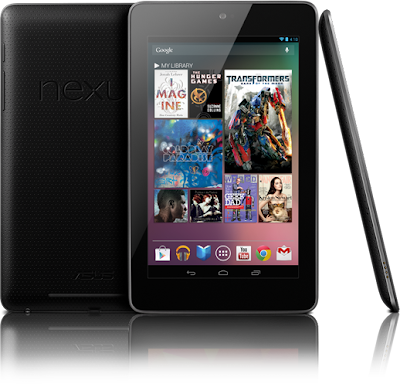
After the Google nexus 7 officially released by google on google I/O 2012, this tablet become the first tablet that first used android jelly bean which it is directly installed on it. and for you that search the tutorial how to root galaxy nexus you were in the right place. because at this time i want to share the tutorial with the most complete instruction. Please notice that once you root your nexus, this device will lose the warranty. The only way to get back the warranty is revoke the root acces and by re applying the original firmware.
If you do not know what rooting is, Rooting is process which will gives you super user acces over your phone. You can install custom ROM’s like Cyanogenmod,MIUI etc. and do some cool customization more.
READ FIRST Please follow all the below instructions that i mentioned carefully to make sure that the Nexus 7 is rooted successfully. Please check your battery. Minimum battery life should be 60% plus to make sure that your phone doesn’t get turned Off in the middle of process.
READ SECOND do with your own risk. we are not responsible for any thing that happens to your phone in the process.
Pre Requirements:
First Back up all your phone data. For backing up SMS,call logs,Gmail,Google calender you can use: SMS Backup + Enable USB debugging on your nexus 7 by going to ” Settings > Applications > Development > USB debugging” where the USB Debugging option should be checked. You need to have Android SDK installed on your PC. Download Download Clock Work Recovery(CWM). Download rooting package. Place the CWM as well as rooting packages(super user) as it is in the “platform-tools” folder in “C:/Android” folder. Once placed, then open the command prompt in your computer by pressing the “Win + R”, enter “cmd” then push enter to start the command prompt.
To make this easier, you should put the su zip on the sdcard for later. -In terminal, cd to the directory you have your sdk in. Then cd into platform-tools.
How To Install Clockworkmod Recovery on nexus 7 tablet
Connect your Nexus 7 tablet to your PC and enter bootloader mode. then type adb push path-to-zip/JB-SuperSU.zip /sdcard
enter the below mentioned commands as it is one by one after the command processes the device, cd platform-tools adb reboot bootloader
wait for a second
Now type the following command:”fastboot oem unlock“. then select unlock to unlock nexus 7 tablet
you now need to enter the Nexus 7 in the recovery mode so that the clockworkmod recovery mode can be flashed in the device.
How to Root Google Nexus 7 Tablet
First, Place the rooting package(JB-SuperSU.zip) that you downloaded above in the root of your SD card.
Now turn off your device and then boot to recovery by pressing Volume Up+Volume Down +Power buttons.
then navigate to “install zip from sdcard > choose zip from sdcard > JB-SuperSU.zip“.
After the flashing is complete select “reboot system now“.
Congratulations.. You now have successfully root Google Nexus 7 tablet
see you in next tutorial for android. if you want to ask anything please comment
Sky Go is the streaming service that Sky Italy has recently launched for users in possession of a device with Android Operating System. But how to install Sky Go application on italy? To which devices are available? Here is a short guide explaining in a few simple steps the contents of the note payTV of Rupert Murdoch.
After available for Android tablet, Sky Go now is available exclusively for Samsung Galaxy Tab 8.9 and Samsung Galaxy Tab 10.1. You can also enjoy the experience Sky Go for smartphones, Windows PCs and OS X. For who That is in possession of a digital tablet Samsung can watch different Sky channels using the appropriate application.
Screenshot
The Sky Go apps for the note, you can only be downloaded through the service Samsung Apps: therefore, for the download go here , you must access the korean store exclusive group and search to find it quickly (in the category Entertainment). The service Sky Go in Italy is open to all Sky subscribers and for those who have signed up to the Sky HD. After installing the app, just register on the website officially enter their data as a Sky subscriber, then log in and activate the service via mobile devices.
Be careful, because the Sky Go application that resides on Google Play is dedicated only to Sky subscribers in the UK, so it does not work in Italy. Among other things this app for the British territory is compatible not only with the Samsung Galaxy Tab but also with many HTC smartphones with Android heart, so it is reasonable to assume that in our country these devices will be supported in the future.
If you want to get updates on Sky Go for Android, installation guide, include your e-mail in the box below: