Showing posts with label how. Show all posts

Tutorial How to Increase Internal Memory of Samsung Galaxy Y GT S5360

As you All know that Samsung Galaxy Y has only 190 MB internal memory.Which is of course very low for most users .So if we increase the internal memory we can install as many more apps and games as we like without worrying about Internal memory full error You can increase internal memory of any android phone here with m instructions.
Try this procedure at your own risk. I will not be held responsible if your SD card is empty so take backup Dont  worry nothing will happen to your phone if anything goes wrong

Downloads :
4shared - CWM.zip
Mediafire -Link2sd Apk


Instructions :

Step 1. You first need to root your Samsung Galaxy Y. If you dont know What is Root? or How to Root?click here

Step 2.Proceed with caution and backup your data first!
You can’t obviously increase your internal memory literally. But you can allow your Android to use some of your SD card’s storage to use as internal memory to install applications and games directly. This helps you keep your phone running at an excellent condition as well as let you install as many games and apps as you wish.

Step 3.Switch off your phone and boot into recovery mode by pressing Volume up  + Home button + Power Key together

Step 4.you are now in Recovery mode here Touch screen does not work use volume up and down button to go up and down and home button to select.

Step 5.Select “apply update from SD card” then Locate and Select “CWM.zip”

Step 6.Now you are in Clock-recovery Mode here select “advanced” now select “Advanced and Debugging”, select “Partition SD Card” On the screen “For Ext Size”

Step 7.Select the size you will want your new internal memory storage to be. A max size of 1024 MB (1GB) is advised.

Step 8.On the “swap size” screen , select 0M Now you wait a minute for your SD card to be partitioned.

Step 9.Afterwards, select “reboot recovery”, then select “reboot system now”.

Step 10.Your phone will reboot.Install link2sd on your phone.Now Select link2sd Choose “recreate mount script”, then select “ext3?.

Step 11.After reboot when you open link2sd “recreate mount script” you will see that your partition is selected is an ext partition

Step 12.Reboot your phone. After your phone reboots, you may launch the linksd app again and move installed software to the partition you created by “linking” them.

@Enjoy..

Download applications for android phones Tutorial How to Increase Internal Memory of Samsung Galaxy Y GT S5360 Here:
Read More..

Tutorial How to play Eternal Legacy on Galaxy Y


Hello, I will show u how to play Eternal Legacy on Galaxy Y...

Description :
Enter a huge world made of cinematic 3D environments in this intense role-playing game, a worthy heir of its Japanese predecessors. The absorbing story implies heavy responsibilities: as Astrian, you must save Algoad from destruction and restore the living bond between humans and nature. Enjoy dozens of hours of exploration and fighting in majestic landscapes. Talk to the people you meet, featuring full voice acting: they may join your team, reveal some secret, give you a quest, and more. The thrilling turn-based fighting system will bring you to the heart of action!


  • The best, deepest Japanese role-playing game available on your HD smartphone.
  • Freely explore majestic regions, real-time rendered in full 3D, with free 360° camera.
  • A mix of fantasy and sci-fi: fight with swords or guns, face robots and magic, fly your own ship!
  • Play as Astrian and save Algoad from destruction in this intense quest, lasting dozens of hours.
  • Dynamic turn-based fights: preset your attacks, which will be triggered once the gauge is filled.
  • Choose the 3 fighters of your team among the 8 different characters you meet along the way.


Requires Android : 2.1+

Play Link : None

Download Links : Armv6 - Armv7
Apk + Data
Mediafire 
Eternal Legacy Apk+Data

Chainfire3D and Plugins
GalaxyYoungStation - How to install Chainfire3D and Plugins

Instructions :
1. Download and Extract Apk+Data file
2. Install Apk file
3. Put the data files GloftELHP to sdcard/gameloft/games/here
4. Open Chainfire3D click on Reduce Picture size and Select Qualcomm Plugin
5. Open Game @Enjoyyyy... 

Video :


Screenshots :

Download best android apps Tutorial How to play Eternal Legacy on Galaxy Y Here:
Read More..

Castle Master 3D on Samsung Galaxy Y


? #1 App downloaded in Korean T Store

? #1 App downloaded in Thailand App Store

#1 in RPG & Strategy game in Canada, Korea, Indonesia and other 13 countries. 

? Introduced as a most favorable game in App Judgement, show owned by Revision 3, one of the biggest internet TV shows in USA.

? Introduced in Pocket Gamer, a major England’s mobile game site!- Strategy-RPG Castle Master 3D fights its way onto iPHone and iPad

------------------------------------------------------------

?Romance of the three kingdoms’ Strategy + Diablo’s Action! ? 

Full 3D Action Strategy Siege Game, Castle Master!

Massive Battle of 600 will thrill you! First 300 vs. 300 siege battle on mobile!

With 300 followers, go destroy the gate of the enemy castle!

Humans, abandoned by God for their arrogance and greed, were deprived of all their 45 castles by the evil hordes from Hades.

And the last knightage gathered together for the barely survived young prince.

Starting from an action to take back the castle ‘Gaia’, humans’ counterattack begins now!

Lose yourself in the world of a classic RPG!

Customize your character’s stat points as you wish!

You can develop your character to be Paladin-style knight with one-hand sword, speedy knight with two swords, fearsome knight carrying giant blade with great damage. Customize your character with 27 weapons and 9 sets of armors, enjoying the thrill of level-up!

Build facilities to upgrade your castle and recruit soldiers!

Defeat the castles of evil hordes and appoint castle lords!

Turn the tide of the war by spying and redeploying!

Win the love of Zeus’s Daughter to achieve the ultimate weapon, Zeus Blade!

You can find merchants of weapons, armors, rings and potions and servants who will help you raise the loyalty of citizens and lords in town.

Don’t forget to find Zeus’s daughter, who is willing to give you the ultimate weapon, Zeus Blade. Though, only the chosen one can get her love.

Requires Android : 2.2+

Play Link : None

Download Links : Armv6 - Armv7
Apk
Zippyshare - Castle Master 3D Apk
GalaxyYoungStation - Chainfire 3D Apk

Instructions :
1. Download and Install Apk and press Done.
2. Install Chainfire 3D and its Plugins
3. Follow the Video Guide :

Video Guide :


Screenshots :


Download best android apps Castle Master 3D on Samsung Galaxy Y Here:
Read More..

How to Run GTA 3 smoothly on Samsung Galaxy Y GT S5360 Stock Rom Using CM7 Libs

WARNING: I WILL NOT BE HELD RESPONSIBLE FOR ANY LOSS IF YOU BRICKED YOUR PHONE. DO THIS AT YOUR OWN RISK

Requirements:

1. Rooted Phone (How To Root Samsung Galaxy Y)
2. Chainfire 3d and plugins (How to Install Chainfire 3D and Plugins)
3. cm7 libs by yusepz (cm7 libs for Galaxy Y by yusepz)
4. GTA 3 {APK + DATA}
5. Root Explorer (download here)

Instructions:

1. Install Chainfire 3d, its plugins and File Explorer
2. Install Plugins and tick Experiment EGL
3. Go to Open default openGL Settings > Tick Reduce Texture Quality and Texture Size and select Qualcomm as Plugin
4. Download and extract "cm7 libs by yusepz" to the root of sdcard
5. Copy the Content of egl folder found in /sdcard/cm7 libs by yusep/system/egl/"here" to /system/libs/egl/"here"
6. Restart your phone
7. Now Install GTA 3 apk and copy the data in here /sdcard/android/data/"here"
8. Open GTA 3
9. Accept user license agreement.
10. When download prompt appears, hit the back button and press home button.
11. In the status bar, touch the gta 3 notification to open up and game.. You can play the game
12. Enjoyyy...

Source : XDA thread

Video :


Screenshots : (Prove)

Download android app market How to Run GTA 3 smoothly on Samsung Galaxy Y GT S5360 Stock Rom Using CM7 Libs Here:
Read More..

How to easily scan QR code on android phone

Now theyre everywhere: in magazines, on business cards, product packaging, and much more. I refer to QR codes, those special square bar codes scanned if the camera of a mobile phone Web pages give access to, personal information and other types of multimedia content online. I bet you have heard often, and then tell me how come you havent tried to "translate" one with your smartphone? You dont know how to do it? Then remedied immediately.

Scan Qr Code On Android Phone

Follow the directions on How to scan a QR I am going to give you and I promise that you will learn in less than no time to use the QR code to display links, information, etc. hidden in paper journals, on the packaging of foodstuffs and on business cards visit more technological. Basically, all you need to do is install the right app for your smartphone and immortalize the QR code to be translated. Lets see now how to do it!
how to scan qr code on android

Read Also : download best android lockscreen

If you want to learn How to scan a QR and use an iPhone, I suggest you open the App Store and download QR Reader for iPhone, one of the best free app QR codes that allows not only to scan the QR code that exist but also to create new ones, share them online and export the scans performed in CSV format.

It is very simple, because the camera all the latest iPhone models allow extremely rapid recognition of QR codes. Just start the application, frame your QR code from a few inches away while holding the phone in portrait orientation (so that occupies the central part of the screen) and wait for the "translation". In the case of links to online content, these start with an internal browser to QRReader for iPhone without leaving the app.
apps to scan qr code
If instead you use a smartphone Android, no doubt about it. If you want to frame a QRwithout having the slightest problem you need to use the free application QR Droid that allows not only to quickly read QR codes, but also to create new ones (e.g. with your own business card) and keep a history of all QR code scanned. Is also compatible with mobile phones cheaper, but of course the camera quality is essential in order for the app to play properly. Just to be clear, a smartphone equipped with an autofocus camera can scan QR code much quicker than a phone without this technology.
scan qr code to display link
To scan a QR code QR with Droid, you dont have to do is launch the app and follow theon-screen instructions (in Italian). The software will guide you to the correct frame the QR code suggesting not to hold the phone too near the surface, keep the steady hand, etc.. In essence, what you have to do is place your smartphone, go to a few centimetres from the QR code and place it centered in the scene for a few seconds.
When the scan is complete, you will be asked if youd like a direct link or the information found, or if you want to first analyze. All very simple and intuitive. In addition, goingHistory tab of the app you will be able to browse all scanned with QR codes Droid: very handy if you forgot some information scanned with your application and want to retrieve it quickly.

Read More..

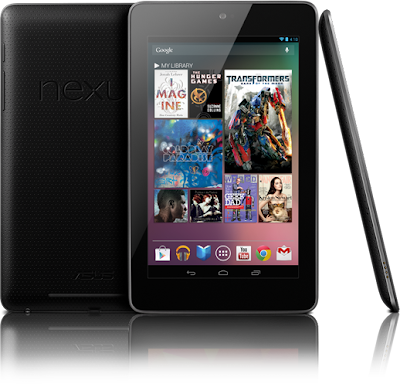
How To Root Google Nexus 7 Tablet

After the Google nexus 7 officially released by google on google I/O 2012, this tablet become the first tablet that first used android jelly bean which it is directly installed on it. and for you that search the tutorial how to root galaxy nexus you were in the right place. because at this time i want to share the tutorial with the most complete instruction. Please notice that once you root your nexus, this device will lose the warranty. The only way to get back the warranty is revoke the root acces and by re applying the original firmware.

This tutorial below will give you how to unlock and root Google Nexus 7 Tablet.

If you do not know what rooting is, Rooting is process which will gives you super user acces over your phone. You can install custom ROM’s like Cyanogenmod,MIUI etc. and do some cool customization more.

root google nexus 7 tablet


READ FIRST
Please follow all the below instructions that i mentioned carefully to make sure that the Nexus 7 is rooted successfully. Please check your battery. Minimum battery life should be 60% plus to make sure that your phone doesn’t get turned Off in the middle of process.

READ SECOND
do with your own risk. we are not responsible for any thing that happens to your phone in the process.


Pre Requirements:

First Back up all your phone data. For backing up SMS,call logs,Gmail,Google calender you can use: SMS Backup +
Enable USB debugging on your nexus 7 by going to ” Settings > Applications > Development > USB debugging”  where the USB Debugging option should be checked.
You need to have Android SDK installed on your PC. Download
Download Clock Work Recovery(CWM).
Download rooting package.
Place the CWM as well as rooting packages(super user) as it is in the “platform-tools” folder in “C:/Android” folder. Once placed, then open the command prompt in your computer by pressing the “Win + R”, enter “cmd” then push enter to start the command prompt.

To make this easier, you should put the su zip on the sdcard for later.
-In terminal, cd to the directory you have your sdk in. Then cd into platform-tools.


How To Install Clockworkmod Recovery on nexus 7 tablet

  1. Connect your Nexus 7 tablet to your PC and enter bootloader mode.
    then type
    adb push path-to-zip/JB-SuperSU.zip /sdcard
  2. enter the below mentioned commands as it is one by one after the command processes the device,
    cd platform-tools
    adb reboot bootloader
  3. wait for a second
  4. Now type the following command:”fastboot oem unlock“. then select unlock to unlock nexus 7 tablet
  5. you now need to enter the Nexus 7 in the recovery mode so that the clockworkmod recovery mode can be flashed in the device.
how to root google nexus 7 tablet

How to Root Google Nexus 7 Tablet

  1. First, Place the rooting package(JB-SuperSU.zip) that you downloaded above in the root of your SD card.
  2. Now turn off your device and then boot to recovery by pressing Volume Up+Volume Down +Power buttons.
  3. then navigate to “install zip from sdcard > choose zip from sdcard > JB-SuperSU.zip“.
  4. After the flashing is complete select “reboot system now“.
  5. Congratulations.. You now have successfully root Google Nexus 7 tablet

see you in next tutorial for android. if you want to ask anything please comment
Read More..

How To Install Sky Go Apps On Android Device

Sky Go is the streaming service that Sky Italy has recently launched for users in possession of a device with Android Operating System. But how to install Sky Go application on italy? To which devices are available? Here is a short guide explaining in a few simple steps the contents of the note payTV of Rupert Murdoch.

After available for Android tablet, Sky Go now is available exclusively for Samsung Galaxy Tab 8.9 and Samsung Galaxy Tab 10.1. You can also enjoy the experience Sky Go for smartphones, Windows PCs and OS X. For who That is in possession of a digital tablet Samsung can watch different Sky channels using the appropriate application.

Screenshot

install sky go apps on android
sky go apps for android

The Sky Go apps for the note, you can only be downloaded through the service Samsung Apps: therefore, for the download go here , you must access the korean store exclusive group and search to find it quickly (in the category Entertainment). The service Sky Go in Italy is open to all Sky subscribers and for those who have signed up to the Sky HD. After installing the app, just register on the website officially enter their data as a Sky subscriber, then log in and activate the service via mobile devices.

Be careful, because the Sky Go application that resides on Google Play is dedicated only to Sky subscribers in the UK, so it does not work in Italy. Among other things this app for the British territory is compatible not only with the Samsung Galaxy Tab but also with many HTC smartphones with Android heart, so it is reasonable to assume that in our country these devices will be supported in the future.

If you want to get updates on Sky Go for Android, installation guide, include your e-mail in the box below:
Read More..

How To Protect Wifi Network With Wifi Guard For Windows

With Wi-Fi Guard you can secure your WiFi network and block unauthorized access. Today i will share a great program for Windows that allows you to protect your WiFi network from unauthorized access. You can check with this program, all the devices connected to your WiFi network and how to block unauthorized. Lets see how it works and what is the Wi-fi Guard features.


Protect Your Wifi Network

If you have a home router or a WiFi modem and you suspect that some unauthorized signal will close your internet, with this program you can solve your problems.

Obviously, however, the best solution is to protect WiFi network on android smartphone is with a very strong password and complex. It will not be easy to remember, but at least you can be sure that no one can access your WiFi network without your permission.

That said, I advise you to try to use the Wi-Fi Guard application to monitor and protect your WiFi network.
how to protect wifi connection on windows


How To protect WiFi Network

Wi-Fi Guard is a completely free program that allows you to quickly and easily protect any WiFi network.

The program sends you a notification every time a new device connects to your WiFi network, and if you find that the device is not authorized, you can highlight it and lock it.

This program provides a real-time scanning of your WiFi network to report you as intruders. You will absolutely customize the interval at which the program will execute the scan. After each scan will tell you if it is collected intruders in your WiFi network.

The programs interface is really very clean, organized and intuitive. All functions are on hand and in seconds you can solve the porblem that may appear. For each connected device you can also see the IP address and the MAC address very easily.

In addition, the program is highly customizable according to your preferences and needs. If you want you can set it to start automatically when Windows first Booting. Wi-Fi Guard is a great program to protect your WiFi network from unauthorized access.

Alerts you when an unauthorized device connects and allows you to lock it. If someone coonect to the WiFi network, this program is for you! Compared to similar programs, then this program is also faster and more intuitive.

Download Wi-Fi Guard
You can download it for free here .
Read More..

How can I receive photos via Bluetooth on my BlackBerry Bold

Q. Do you need a specific pass code or something? I tried 0000 and that didnt work. I was able to SEND photos, but not RECEIVE them.

A. you have to go the pictures, click the menu button, scroll down to "recieve using blutooth ".

hope this helped
=]

Can you get the radio on blackberry bold in Australia?
Q. I have recently bought a Blackberry Bold and was just wondering if it is possible to get the radio on it in Australia? is there an app or something that i can download or purchase?
If so, can someone please point me in the right direction. THX!

A. Nobex Radio Companion

http://www.nobexrc.com/

My blackberry bold 3G will not connect to the charger, how can i fix this?
Q. My blackberry bold 3G ran out of charge so I went to charge it as I usually do but it wouldnt turn on at all, I then went to connect it to my laptop with no luck because the phone has to be charged to do so! Urgent Please Help!

A. you never stated which bold it is..
sounds like you own a 9900 or a 9790...
get yourself down to the repair shop, sounds like the charging port is faulty!


Powered by Yahoo! Answers
Read More..

How to add a beautiful sidebar widget to your blog

Want to add a beautiful widget to your blog which expands its size when mouse reaches over it. To get this effect keep a small image in the div of id "small" and large image in the div of id "large" This type of widgets are generally used for advertisements.

1) Go to Blogger Dashboard > Design > Page/Edit Layout.

2) Add a Gadget > HTML/JavaScript.

3) Copy the code below and paste it into the window.


<html>
<script>
function on_it()
{
var a=document.getElementById(small);
var b=document.getElementById(large);
a.style.display=none;
b.style.display=inline;
}
function out_it()
{
var a=document.getElementById(small);
var b=document.getElementById(large);
a.style.display=inline;
b.style.display=none;
}
</script>
<div onmouseover="on_it()" onmouseout="out_it()">
<div id="small" style="display:inline;"> 
---content of the widget when mouse is not over it-----------
</div>
<div id="large" style="display:none;">
---content of the widget when mouse is over it-----------
</div>
</div>
</html>


 See the example below : 


Read More..

How To Install and Activate Your BBM on Your iPhone and Android

By now, almost everyone knows that BBM for Android and iPhones is already available for some in some parts of the world and will be available to others within days. 

If you had downloaded yours on your device but dont know how to get it activated, follow the steps in this guide.

Requirements
1. BlackBerry ID which you can register from here
2. Supported Android or iPhone 
Note: Direct download link for BBM for Android can be found here

Procedures

1. The first thing is to download the app from Google Play Store or Apple App Store depending on your device type.


2. After downloading and installing, launch the BBM app and you will be presented with a screen to enter your Email address if you initially registered an email to be among the first people to get the app. On doing this, you would get the above screen. 

3. If you have a BlackBerry ID, input it in the provided space. If you dont, register a new one.
Note: entering the same BlackBerry ID on another BBM account will log you out from BBM on the initial BlackBerry phone. Therefore, if you wish to have BBM work on your multiple devices, you would need to have separate BlackBerry ID on all your devices.


4. On successfully signing in with your BlackBerry ID, you will get your pin which  you can use to invite friends or continue to BBM as seen in the image below.


5. Now you can start using your BBM immediately, put your profile display and personal message as you wish.


Are you still confused on how to set up your BBM on your iPhone and Android device? Drop a comment and we would try to help you solve it. 

Like our Facebook page and Follow on Twitter for latest news on smartphones
Read More..

Infinix Valentine Promo How To Be The Lucky Winner

Infinix Mobility, global player in smart phone manufacturing, has unveiled a Valentine’s consumer promotion tagged, ‘Share the Love Promo.’

The promo, which runs between January 27 and February 12 this year, is designed to reward the customers of Infinix phones for the Valentine season.

The grand prize of the promo is an all-expense paid weekend getaway for a couple at a beautiful resort, the company said in a statement, adding that other prizes included a dinner for a couple at an exquisite Chinese restaurant and free movie tickets as consolation prizes.

The firm said, “To qualify for this promo, a consumer needs to buy any of the Infinix smart phones: X502 (Alpha Marvel), X402 (Alpha Diamond) or X570 (Alpha); write a short love note to their partner, post the love note on the Infinix Facebook page (www.facebook.com/InfinixMobile) or drop it with an Infinix in-store rep while indicating the IMEI of the phone bought and their contact details.

Infinix X502

 “Customers with the highest likes on Facebook and the customer with the best love note submitted at the Infinix in-stores will be selected. Winners will be contacted on February 13 to redeem their prizes.”

Infinix Mobility Head of Marketing, Mr. Peter Zhou, was quoted in the statement as saying that the brand believed in the strengthening of relationships and therefore wanted to use the opportunity of the Valentine season to re-ignite bonds between couples.

He said, “Infinix Mobility brand’s promise is to add fun to the way consumers communicate, work and play. In furtherance of this belief, we have designed this promo to encourage consumers to connect better with their spouses.

“If you look at the promo prizes – weekend getaway, dinner for a couple and movie tickets to the cinema – they were carefully selected to re-enact the love flame.

“We encourage the consumers to buy the Infinix smart phones and they could be the promo lucky winners.”

Read More..